
Download Insta Pro APK for Android
Get more from Instagram with media downloads, privacy controls, custom themes, and useful extra features, all in one Android app.
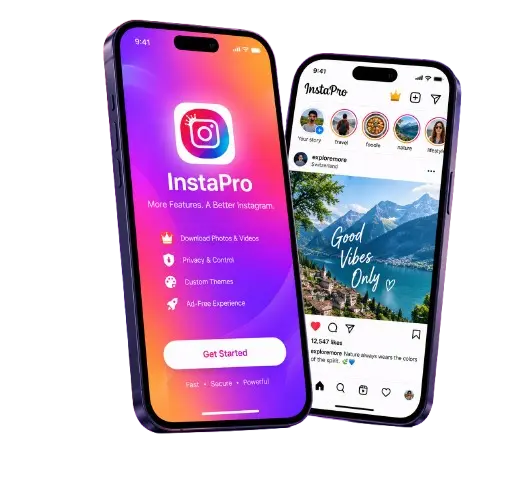
Insta Pro is a modified Instagram app for Android that adds extra features such as media downloads, privacy controls, customization, and other tools that are not available in the same form in the official Instagram app.
So before you install it on your Redmi, Realme, Vivo, OPPO, Samsung, or another Android phone, you should know what it actually does, what the risks are, and whether it makes sense for your account.It can be useful if you want more control over your Instagram experience. However, it is also an unofficial third-party app, so you should not treat it like the regular Instagram app from Google Play.
Insta Pro App Information
Main attraction
Extra Instagram features
Developer
Atnfas Hoak (SamMods)
Price
Free
Downloads
7M

App Name
Insta Pro
Instapro Apk Latest Version
v15.85
Size
78.43 MB
Platform
Android
What Is Insta Pro?
Insta Pro Application is Instagram, but modified. Same login. Same feed. Same people you follow. Different tools. Official Instagram doesn’t let you:
- Save photos to your phone
- Hide when you read messages
- Remove ads
- Manage multiple accounts without logging out
- Upload videos with different compression settings
Insta Pro adds these capabilities. It is not made by Instagram. A developer known as SamMods distributes it. Instagram does not officially support it. But millions of people use it.
People ask, ” Is this just Instagram with a download button?“
The answer is “No“. It adds several features beyond downloads. The download button is just the most obvious one.
InstaPro 2 & InstaPro 3 APK
InstaPro 2 and InstaPro 3 APK are alternate Insta pro mod apk variants that Android users may come across when looking for a new version of Instagram app with additional features. Depending on the specific build, they may offer options related to media saving, privacy, customization, or account management. But, the features and compatibility can vary between builds, so the version number alone doesn’t tell you which one is better.
Before installing either variant, check the exact version, package information, APK source, and available features. You can compare them with the regular Instapro based on what you actually need rather than choosing simply because one has a higher number. Both are unofficial Instagram modifications, so the same security and account-related uncertainties apply.
Why Do People Use Insta Pro?
Let’s be honest: most people aren’t looking for a modified Instagram app just because they like APKs. They usually want one or two specific features. For example:
“I just want to download Instagram Reels.” That’s one of the biggest reasons people search for Insta Pro.
“I don’t want people to know when I’ve seen their message.” Privacy controls are another common reason.
“I manage more than one Instagram account.” Creators, small businesses, shop owners, and social media managers may want easier account switching.
“I want to change how Instagram looks.”Some users simply prefer more customization.
And then there are people who are thinking: “Why should I install a modified Instagram app when the official app already works?” That’s a fair question. If you don’t actually need the extra features, there may be little reason to accept the additional risk of an unofficial APK.
Insta Pro Features

Extra Free Instapro Features Highlights
Here are the main features associated with Insta Pro and why users may want them.
1
Download Instagram Photos and Videos
This is probably the feature that attracts the most attention.
Depending on the build and the type of Instagram content, Insta Pro may provide a download option for supported:
- Photos
- Videos
- Reels
- Stories
That can be useful if you want to save a cooking tutorial, keep a video for offline reference, or save your own content locally.
2
Hide Read Receipts and Other Activity Indicators
Some Insta Pro builds provide privacy options that change what other Instagram users can see.
Depending on the version, these may include controls for:
- Read receipts
- Typing indicators
- Online status
- Story-view visibility
This is useful for people who want a little more privacy while using Instagram.
But remember:
Hiding an activity indicator from another user does not mean Instagram itself stops receiving or processing your activity.
That’s an important difference.
3
Copy Captions and Comments
Have you ever seen a long caption and thought:
“Why can’t I just copy this?”
Some modified Instagram clients add easier text-copying options.
This can be useful for:
- Saving information
- Copying a quote
- Translating text
- Taking notes
- Reusing your own content
The exact way the feature works depends on the version.
4
Extra Upload Options
Some Insta Pro builds offer additional controls for uploading photos and videos.
This may appeal to creators who want more control over their media before posting.
However, don’t expect a modified upload setting to completely bypass Instagram’s own processing.
Instagram can still process and compress media after upload.
So if someone claims:
“Insta Pro guarantees original video quality on Instagram.”
Don’t take that as a fact.
5
Multiple Account Management
Instagram already supports multiple accounts, but modified clients may offer their own account-switching experience.
This can be useful if you manage:
- Personal and business accounts
- Multiple brand pages
- Creator accounts
- Client accounts
For example, someone running a small clothing business in Pakistan or India may manage a personal account plus a shop account from the same phone.
But if multiple accounts are your only reason for installing Insta Pro, remember that official Instagram already has this functionality.
6
Interface Customization
If you are bored with the standard Instagram look, some Insta Pro builds offer extra customization.
Depending on the build, you may find:
- Themes
- Colors
- Fonts
- Appearance settings
- Other interface tweaks
This is mostly a preference feature.
It doesn’t necessarily make Instagram faster or safer.
7
App Lock
Some versions may include an app lock using a PIN or biometric authentication.
That can be useful if family members, friends, or someone else occasionally uses your phone.
But don’t confuse an app lock with full security.
If someone has deep access to your device, an app-level lock isn’t a complete security solution.
8
Translation Features
Some modified versions offer translation tools for captions or comments.
This can be handy if you follow accounts that post in languages you don’t understand.
For users in multilingual markets, this can be a nice quality-of-life feature.

Pros and Cons of Insta Pro App
Before we get into installation, here’s the simple version.
VS
The simple trade-off
More features = more uncertainty. If those extra features are important to you, Insta Pro may be interesting. If account safety and reliability matter more, official Instagram is the easier choice.
Is Insta Pro Safe?
Not automatically. That’s the honest answer.
Insta Pro is a modified application, so you’re trusting the APK and the person or website that distributed it.
Google also warns that installing apps from unknown sources can put your device and personal information at risk. Google Play Protect checks apps from outside Google Play and can warn about or remove potentially harmful apps.
That doesn’t mean every third-party APK is malicious. It means you should verify the actual file instead of trusting a website’s “100% safe” badge.
What should you check?
Before installing:
- Where did the APK come from?
- Is the version what you expected?
- Does the filename look correct?
- Does the file size match the download page?
- What permissions does it request?
- Does a security scan flag anything?
- Is this an account you can afford to risk?
That’s a much better safety checklist than simply asking: “Is Insta Pro safe?”
Can Insta Pro Get Your Instagram Account Banned?
It can carry account risk, but nobody can honestly give you an exact ban percentage. Instagram does not publish a reliable public dataset showing how many Insta Pro users get restricted.
Online reports are mixed.
Some users say they have used modified Instagram clients for a long time without obvious account problems. Others report temporary action blocks or other restrictions. Possible problems can include:
- Action blocks
- Login or verification prompts
- Temporary restrictions
- Other account limitations
- Account disabling
The important point is that risk exists, but the exact probability isn’t publicly known. So if a website tells you, “Only 2% of Insta Pro users get banned.” Ask yourself, Where did that number come from? Unless there is a credible dataset behind it, it’s just a marketing number.
Now comes the main question:
Should You Use Insta Pro on Your Main Account?
This is where the decision becomes personal. Imagine you have two accounts.
Account A Your old personal Instagram with family photos and years of memories.
Account B A new account you barely use.
Would you take the same risk with both? Probably not.
That’s why I recommend thinking about the value of your account, not just the features of the APK.
Higher-risk situation
You should be much more careful if your Instagram account:
- Makes you money
- Represents your business
- Is used for client work
- Has years of important content
- Has a large audience
- Would be difficult to recover
Lower-stakes situation
You have more room to experiment if it’s a secondary account that you don’t depend on. A secondary account doesn’t make Insta Pro “safe.” It simply limits what you stand to lose.
The 4-Phase Insta Pro Decision Framework
Check Your Account
Ask: “How much would it hurt if something went wrong with this account?”
If the answer is: “A lot.” Stick with official Instagram. If the answer is: “Not much.”
You can consider testing the modified app.
Check the APK
Before installation:
- Verify the exact version
- Check the source
- Compare the filename
- Check the advertised file size
- Review permissions
- Scan the APK
- Keep Play Protect enabled
Google recommends keeping Play Protect enabled and notes that it can check apps installed from outside Google Play.
Test the App
Don’t immediately move your most important account. Start small.
Check: Does the app install correctly? Does Instagram load? Do the features you actually wanted work? Does the app crash? Does it request strange permissions? Does the phone behave normally? Does Instagram show any account warnings?
This gives you real information about the particular APK you’re using.
Make the Decision
After testing, ask: Are the extra features worth the trade-off?
If yes, continue carefully.
If no, remove it and use official Instagram.
This is much better than choosing an APK simply because a download website says it is “the best Instagram mod.”
How to Download Insta Pro APK
If you’ve decided to try it, don’t rush through the installation.
1
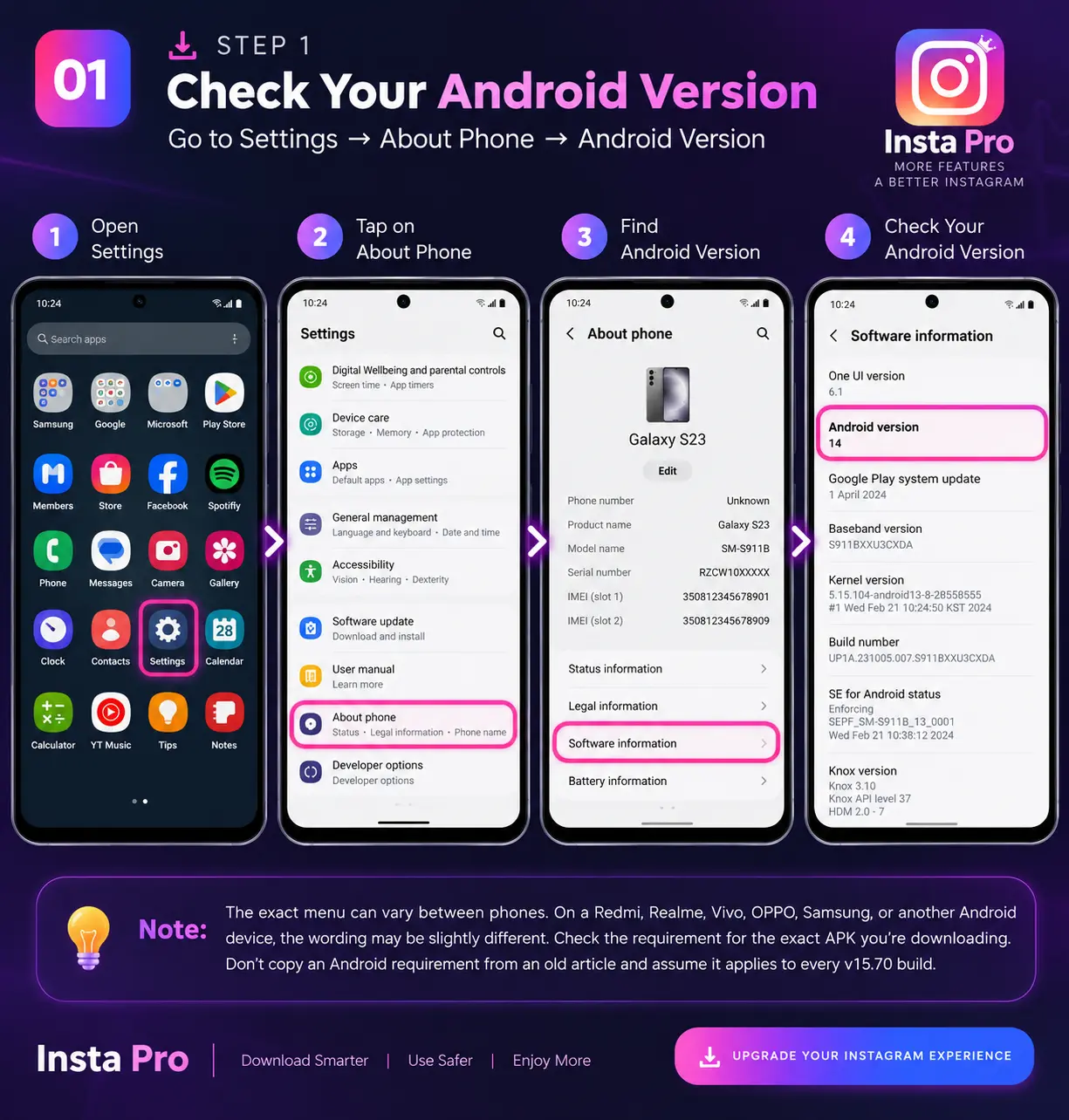
Check Your Android Version
Go to:
Settings → About Phone → Android Version
The exact menu can vary between phones.
On a Redmi, Realme, Vivo, OPPO, Samsung, or another Android device, the wording may be slightly different. Check the requirement for the exact APK you’re downloading. Don’t copy an Android requirement from an old article and assume it applies to every v15.85 build.
2
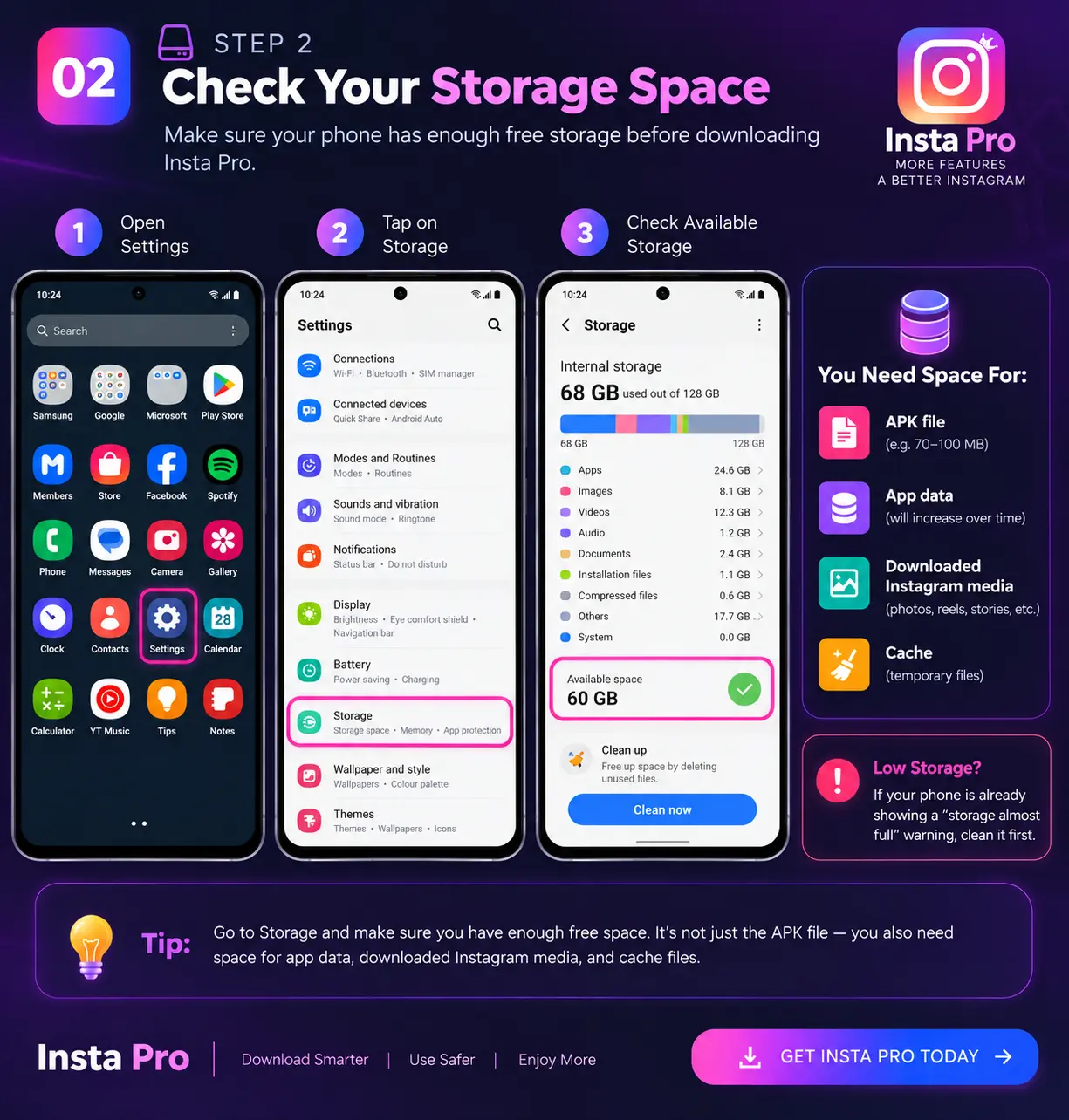
Check Storage
Make sure your phone has enough free storage. Remember that you need space for more than just the APK:
- APK file
- App data
- Downloaded Instagram media
- Cache
If your phone is already showing a “storage almost full” warning, clean it first.
3
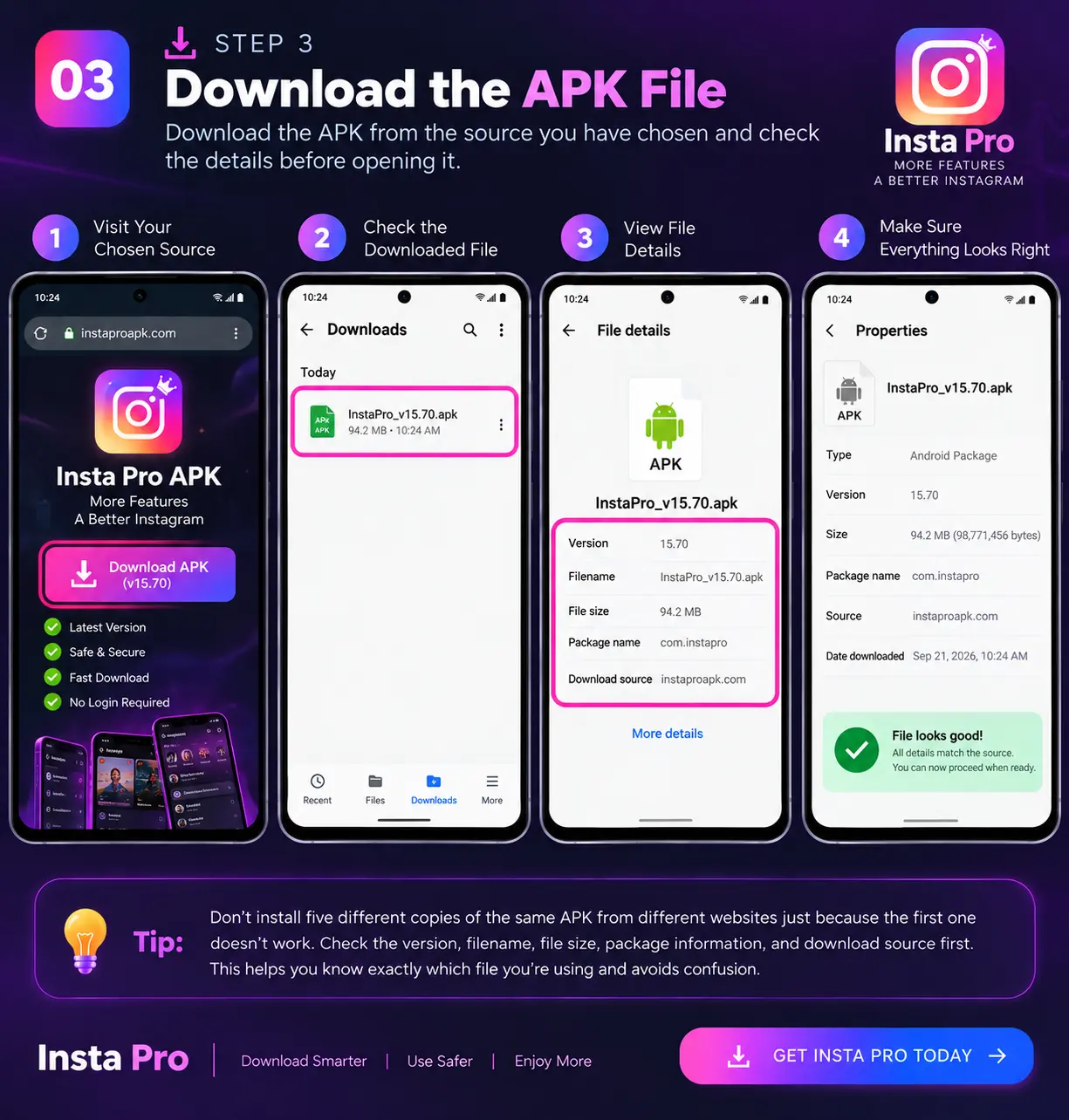
Download the APK
Download the APK from the source you have chosen. Before opening it, look at:
- Version
- Filename
- File size
- Package information
- Download source
Don’t install five different copies of the same APK from different websites just because the first one doesn’t work. That makes it harder to know which file you’re actually using.
4
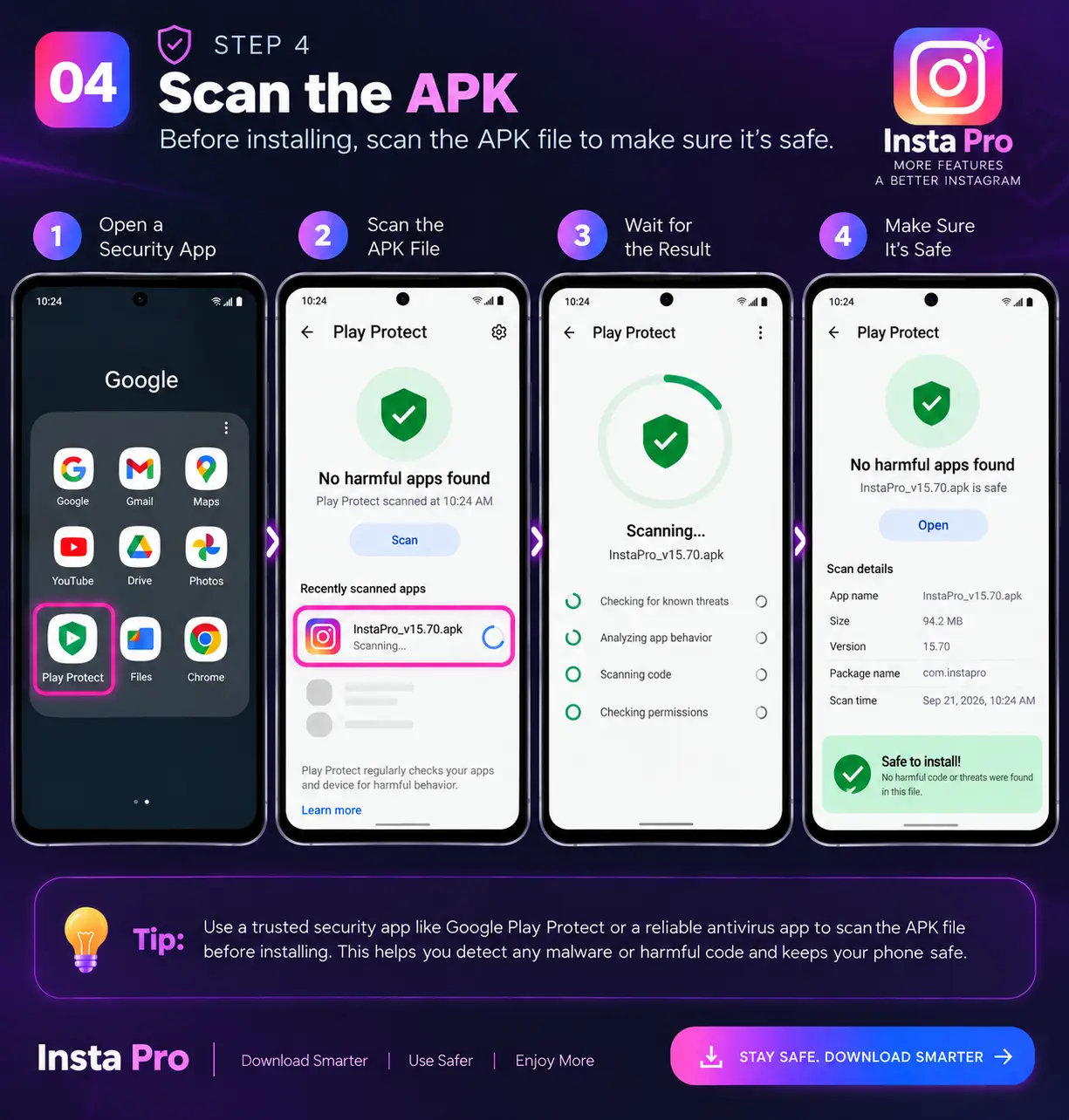
Scan the APK
You can use a multi-engine security service such as VirusTotal to check the APK. A clean scan is a useful sign, but it is not a magic “safe” certificate. Likewise, if one security engine flags a modified APK, don’t blindly ignore it or immediately panic.
Look at:
- Which engine detected it
- What type of detection it is
- Whether other engines agree
- Whether the APK came from a trustworthy source
Avoid simplistic rules such as: “0–2 detections means safe.” or “10 detections means definitely malware.” Security results need context.
5
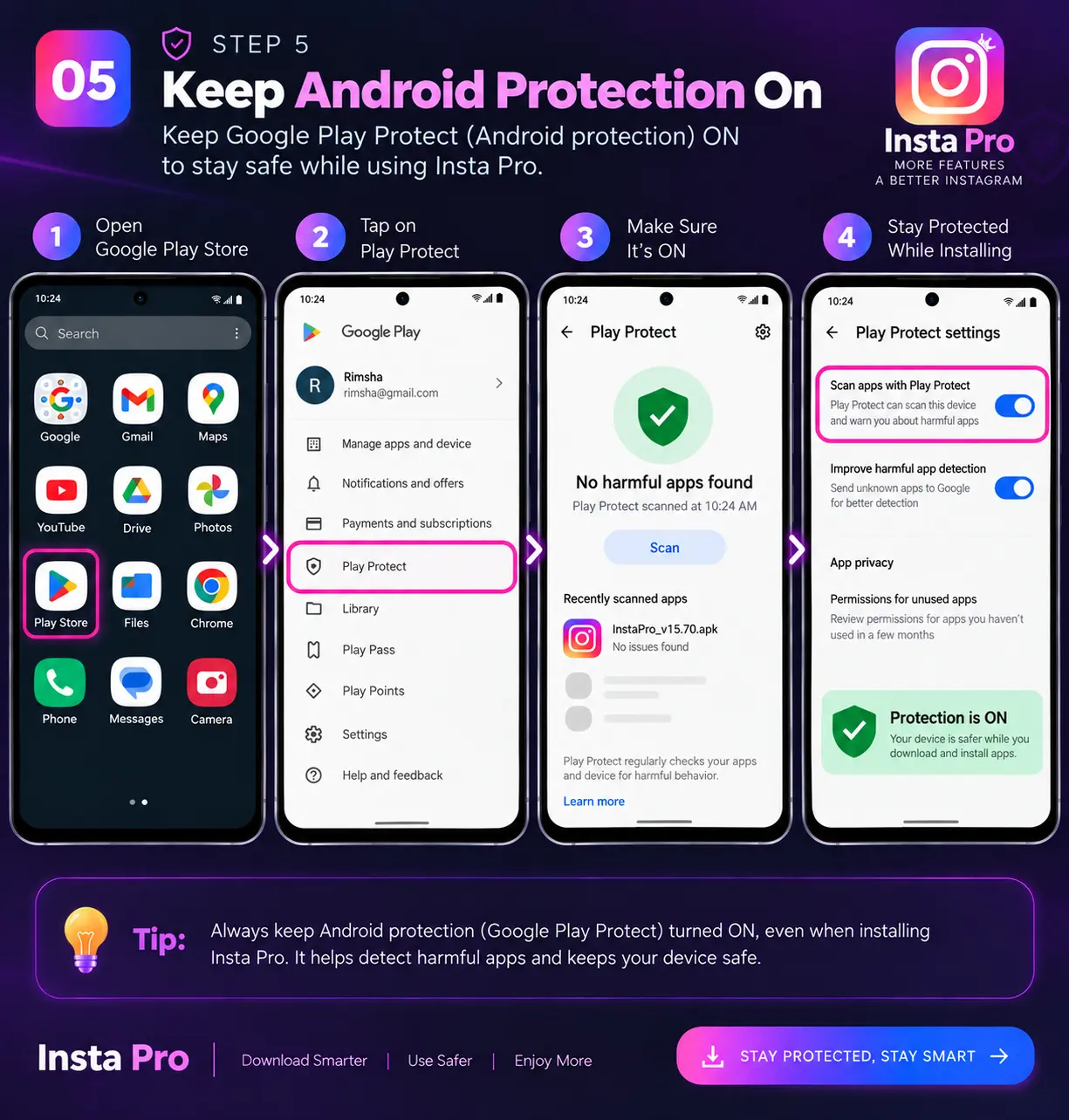
Keep Android Protection On
Don’t turn off Android security features just because an APK website tells you to.
Google Play Protect is designed to check potentially harmful applications, including apps installed from outside Google Play.
If Android warns you about the APK, read the warning instead of automatically pressing Install anyway.
6
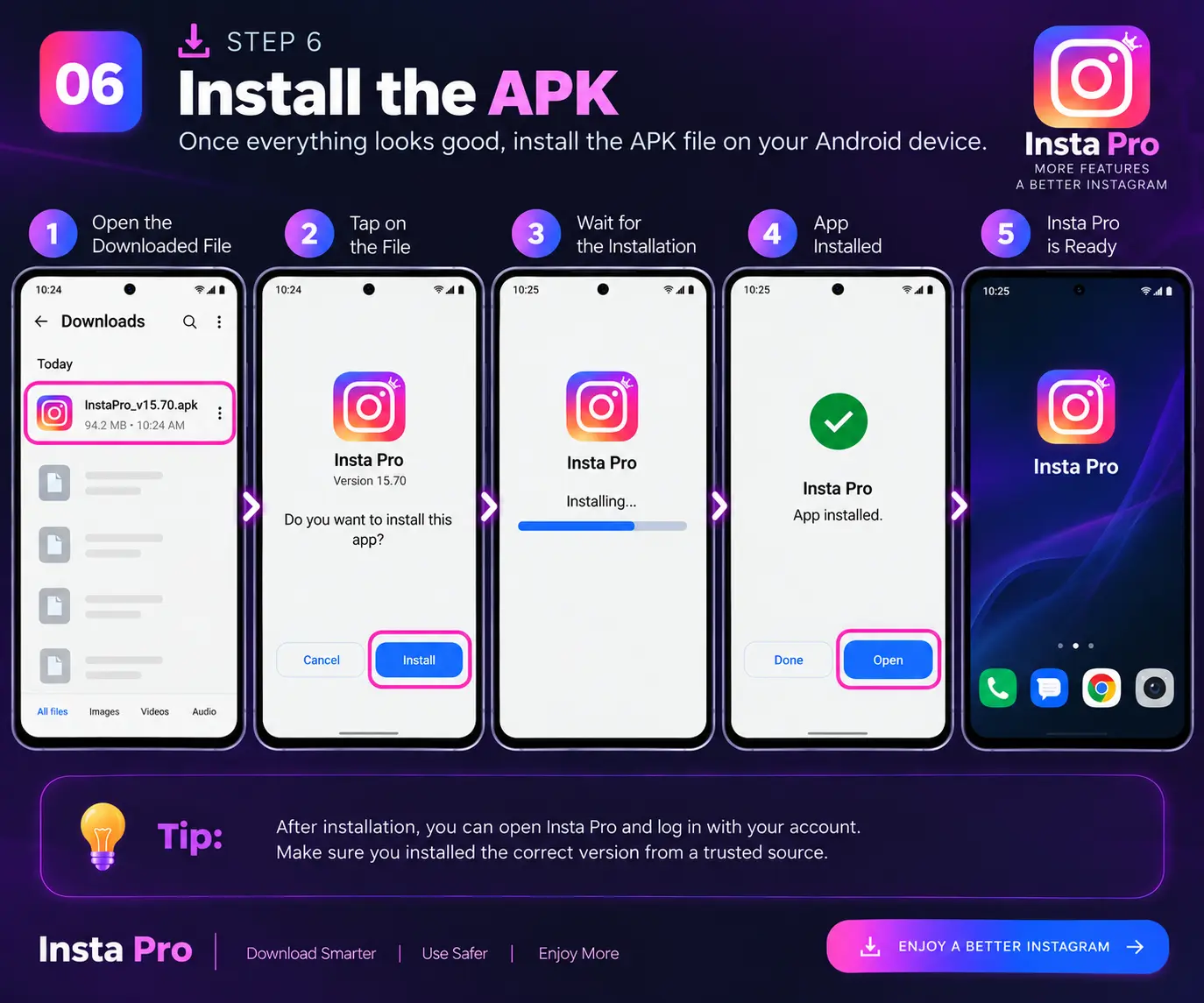
Install
If you’ve decided to proceed:
- Open the downloaded APK.
- Follow Android’s installation prompt.
- Review the permissions.
- Install the app.
- Open it after installation.
Android’s exact installation process can vary by version and device manufacturer. Google recommends getting apps from Google Play, while also providing guidance for apps installed from other sources.
7
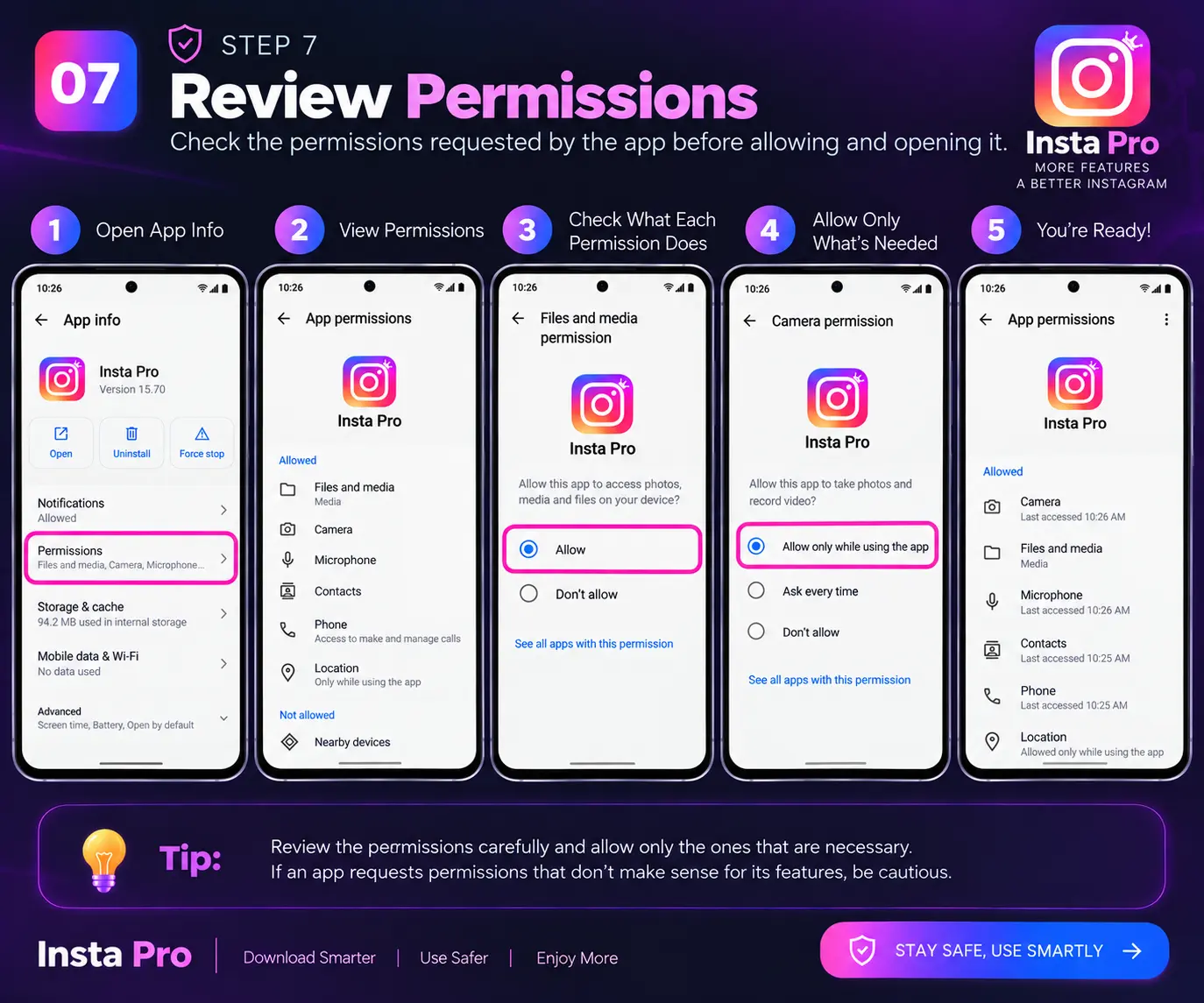
Review Permissions
This step is easy to skip. Don’t skip it.
Ask: “Why does this app need this permission?”
For example, a feature that saves media may reasonably need access to photos or videos. If an APK asks for permissions that don’t make sense for what you want to do, stop and investigate.
Insta Pro vs Instander vs GB Instagram
If you’re comparing Instagram mods, don’t just look at which one has the longest feature list.
| Factor | Insta Pro | Instander | GB Instagram |
|---|---|---|---|
|
Extra Instagram features
Modified Instagram apps can include features beyond the
standard Instagram experience. The exact options can vary
between versions and builds.
|
High | High | Varies by build |
|
Customization
These modified apps may provide additional interface,
theme, appearance, or customization settings compared
with the official Instagram application.
|
Yes | Yes | Yes |
|
Media-saving features
Media-saving options are commonly included in modified
Instagram builds, but the exact functionality depends
on the specific version.
|
Commonly offered | Commonly offered | Commonly offered |
|
Official Meta support
These are third-party modified applications rather than
official Instagram releases, so they are not officially
supported by Meta.
|
❌ No | ❌ No | ❌ No |
|
Manual update risk
Third-party APKs generally do not receive updates through
the same official app-store update system. Users may need
to obtain and install newer builds manually.
|
Yes | Yes | Yes |
|
APK source matters
The source of a third-party APK matters because modified
files can come from different distributors. Users should
consider the source and verify files before installation.
|
Yes | Yes | Yes |
|
Account risk
Using a modified Instagram application can involve
additional account and security considerations compared
with using the official Instagram application.
|
Possible | Possible | Possible |
|
Best for
This describes the general use case represented by each
option in this comparison. Features and suitability can
vary between different builds.
|
Balanced extra features | Feature-focused users | Users looking for another mod option |
Common Insta Pro Problems
Insta Pro Isn’t Downloading Videos
Try these checks:
- Make sure the feature is supported in your version.
- Check the app’s media permissions.
- Make sure you have enough storage.
- Restart the app.
- Try another supported post or Reel.
- Clear the app cache if necessary.
Not every Instagram post will behave the same way.
Instagram Says “Action Blocked”
Don’t keep hammering the same button.
If Instagram has blocked an action:
- Stop repeating it
- Follow any instructions Instagram displays
- Avoid aggressive activity
- Give the restriction time to clear
- Check whether the same account behaves normally in official Instagram
There is no single recovery time that applies to every account.
Insta Pro Uses Too Much Battery
Check Android’s battery settings to see whether Insta Pro is actually using an unusual amount of power.
You can also:
- Remove old downloaded videos
- Clear unnecessary cache
- Close unused background apps
- Restart your phone
Battery usage depends on the phone, Android version, app build, background activity, and how heavily you use application.
Insta Pro Keeps Crashing
- Restarting your phone
- Clearing the app cache
- Checking Android compatibility
- Checking whether you’re using the correct APK build
- Reinstalling only after verifying the APK source
If one specific feature causes the crash, it may be a compatibility problem with that build.
Feed Won’t Load
- Check your internet.
- Open another website or app.
- Restart Insta Pro.
- Force-stop the app.
- Temporarily disable a VPN.
- Check whether official application has the same problem.
If official app is also having trouble, the issue may not be Insta Pro at all.
Insta Pro vs Official Instagram
| Feature | Official Instagram | Insta Pro |
|---|---|---|
|
Official Meta support
The official Instagram app is developed and supported by Meta.
Insta Pro is a third-party modified application and is not
officially supported by Meta.
|
✅ Yes | ❌ No |
|
Standard Instagram features
Both versions can provide common Instagram functions such as
viewing posts, Stories, Reels, profiles and messages, although
features can vary between Insta Pro builds.
|
✅ Yes | ✅ Depending on build |
|
Media-saving options
Official Instagram has limited built-in media-saving functionality.
Some Insta Pro builds may provide additional options for saving
photos, videos or Reels.
|
Limited | Additional options |
|
Privacy controls
Instagram provides its standard privacy settings. Some third-party
builds may add extra controls, but availability depends on the
specific Insta Pro version.
|
Standard | Additional options |
|
Themes & customization
The official app provides limited interface customization.
Some Insta Pro builds may include additional themes, colors
and appearance controls.
|
Limited | More options |
|
Multiple accounts
Instagram officially supports multiple accounts. Some Insta Pro
builds may provide additional account-management controls
depending on the version.
|
✅ Yes | ✅ May offer additional controls |
|
Extra upload settings
Some modified Instagram builds may provide additional upload
or media-quality settings that are not available in the
standard app.
|
Limited | May offer more |
|
Automatic official updates
The official Instagram app receives updates through supported
app stores. Third-party APK builds generally require users
to manually obtain newer versions.
|
✅ Yes | Usually manual |
|
Third-party APK
The official Instagram app is distributed through official
app stores. Insta Pro is distributed as a modified
third-party APK.
|
❌ No | ✅ Yes |
|
Account uncertainty
Using an unofficial modified app can involve additional
account and security considerations compared with using
the official Instagram application.
|
Lower | Higher |
Is Official Instagram Better Than Insta Pro?
For many people, yes. But that doesn’t mean Insta Pro has no value. Think of it this way:
Choose official app if you want:
- Reliability
- Official support
- Normal updates
- Lower account uncertainty
- A simple installation
- Less time spent troubleshooting
Consider the Insta Pro Mod Download if you specifically want:
- Additional media-saving options
- More privacy controls
- More customization
- Extra tools
- Features that the standard app doesn’t provide in the same way
The question isn’t:
“Which app has more features?”
The better question is:
“Are those features worth the extra trade-off for my account?”
Frequently Asked Questions
Here are some helpful explanations to guide you through common queries.
General Questions
Installation & Permissions
Safety & Security
Ads & User Experience
Final Verdict
Insta Pro is interesting because it gives users more control over Instagram.
That’s why people keep searching for it.
The extra features can be useful, especially if you want media-saving tools, privacy controls, or customization that the normal app doesn’t provide in the same way.
But there’s another side.
You’re not installing an official Meta application anymore. You’re trusting a modified APK, its developer, and the website that gives you the file.
That’s a bigger deal than whether the app has five extra themes or ten extra settings. So I wouldn’t tell you: “Insta Pro is 100% safe.” I also wouldn’t tell you: “Everyone who installs it will get banned.”
Neither statement is supported by reliable evidence. The realistic answer is somewhere in the middle:
Insta Pro can offer useful features, but you should accept that an unofficial Insta app client comes with additional security, compatibility, and account uncertainty.